
Table of Contents

Macro Library
Sample Macros
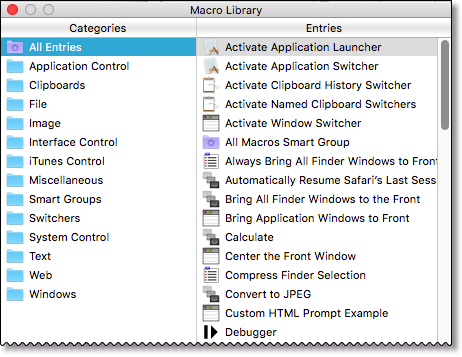
Keyboard Maestro provides an extensive library of sample macros as part of the app installation. Open the Editor, and goto the menu Window > Macro Library to display the library. You can then select one or more macros to import into your library.
Best Macros List on Forum
In addition to the sample macro library, you may be interested in these two topics on the Keyboard Maestro Forum:
–––––––––––––––––––––––––––––
Instructions
Each macro should be added as a child page with it's title and a brief summary added here. The child page should contain an explanation of the macro, a download link, it's triggers, and its actions (see Duplicate Line for an example template). The uploaded file should be in the macros namespace.
Interface Control
Window Movers
Window Movers is a collection of macros that manipulate the front window to allow precise and rapid positioning.
Mouse Positioners
Mouse Positioners is a collection of macros to position the mouse at a corner, side, or center of an internal or external display.
Packages
Rakesh Kumar’s Windows Switcher’s Pack
Rakesh Kumar has created a Windows Switcher’s Pack to make life easier for Windows to Mac Switchers. It includes a set of macros for Mail, Microsoft Word and Microsoft PowerPoint as well as macros to map control-keys to command-keys for various common actions like Cut/Copy/Paste. It also includes a DefaultKeyBinding.dict for Mail to make it work more like Windows users expect.
Application Control
Activate Address Book
Activate Address Book is a macro that just activates the Mac OS X Address Book application - I use it with a hot key trigger of 'F9' (my most commonly used apps are all on the functions key of my Apple wireless k/b).
EyeTV
EyeTV are macros for controlling EyeTV playback via the keyboard, and for updating the EPG.
System Control
Clytie Siddal’s Number Pad
This macro group from Clytie Siddal adds a numeric keypad on your main keyboard, perfect for keyboards that do not have a real number pad. Press the option-Z hot key trigger to activate the number pad, then the letter keys M, and J,K,L, and U,I,O produce the numbers 0, and 1,2,3, and 4,5,6 (the number keys 7,8,9 on the top of the keyboard complete the number pad). Press option-Z to disable the numeric keypad when you are done.
Default Trigger: Hot Key ⌥Z
Actions:
- Insert Text by typing a numeric digit
Open Default Window
This macro allows you to reopen the default window in an application. When switching to an application with no open windows using the program switcher (either Apple’s or Keyboard Maestro’s) the default window is not displayed. The macro uses a simple AppleScript to cause the front application to redisplay its default window.
Default Trigger: Hot Key ⌘⌥0
Actions:
- Execute AppleScript
Text Editing
Duplicate Line
Duplicate Line is a macro that duplicates the current line. It will work well in most text editors.
BBEdit Markdown
BBEdit Markdown are macros that add Bold and Italic styling and link pasting to BBEdit.
Keyboard Maestro Markdown Library
The Keyboard Maestro Markdown Library is an entire library for writing Markdown including automatic link and text formatting.
TeX: Alain Damlamian’s TeX Macros Pack
Alain Damlamian has created a package of macros for TeXShop users. It includes a number of macros for inserting various tamplate text items, such as definition, lemma, proof, etc. It has various hot key, and status menu triggers, and displays as a floating palette in TeXShop. This macro file requires Keyboard Maestro 3.4 to import properly.
Duplicate Line
This macro duplicates the current line. It will work well in most text editors. It works by selecting the current line, then Copy, then deselect the line and Paste, and finally restores the clipboard. It then reselects the just duplicated line to highlight it and allow further duplication.
Default Trigger: Hot Key ⌘L
Actions:
- Type the ⌘Left Arrow Keystroke
- Type the ⇧Down Arrow Keystroke
- Type the ⌘C Keystroke
- Type the Down Arrow Keystroke
- Type the ⌘V Keystroke
- Type the ⇧Up Arrow Keystroke
- Set Clipboard To Past Clipboard 1
Select Line
This macro selects the current line. It will work well in most text editors. It works by moving to the start of the line, and then extending the selection down one line.
Default Trigger: Hot Key ⌃D
Actions: Type the ⌘Left Arrow Keystroke Type the ⇧Down Arrow Keystroke
Text: Philippe Martin’s Menu Glyphs
This macro group from Philippe Martin allows you to insert various menu glyphs like ⌘ and ⇧. Full list: ← → ↑ ↓ ↖ ↘ ↩ ⇞ ⇟⇥ ⇧ ⌃ ⌘ ⌤ ⌥ ⌦ ⌫ ⎋.
Actions:
- Insert Text by Pasting
- Set Clipboard To Past Clipboard 1
Windows
Move and Resize Windows
This macro group allows you to move and resize windows using the arrow keys. Press the control-W hot key trigger to activate the macro group (an optional palette appears) and then use the arrow keys to nudge windows around. Hold the option key down to move by 10 instead of 1, or the shift key to resize instead of move. Note that some applications do not like the windows resized under them (eg Eudora and Quicken). Press control-W to disable the macro group when you are done.
Default Trigger: Hot Key ^W
Actions:
- Move or Resize front window by varying amounts
Games
Plants vs Zombies
Plants vs Zombies is a great game with lots of depth and interest to it. But it can get a bit tedious racking up gold for your next purchase. Thus articles on gold farming suggest ways of getting gold, but setting up such a farm is rather tedious. Enter Keyboard Maestro! This macro will setup a gold farm (as described in 460: Alternate Setups). Start Plants vs Zombies, start the Last Stand game, and then run this macro to select and plant the various plants. Watch a video of the macro in action.
Default Trigger: Status Menu
Actions:
- Lots of recorded clicks to select plants
- A couple Move & Clicks and Pauses to start playing
- Lots of recorded clicks to plant plants
Music
Now Playing in Spotify
Now Playing in Spotify is a macro that will paste a line that tells people what you are listening to in Spotify. It will also link them to the track in Spotify so they can click it and listen to it with one click. The line will say something like:
Listening to SongTitle by ArtistName - spotify://track/4c79qPVAI5MMHi5g34ay76
The spotify link will only be clickable for the user if they have the Spotify app installed on their computer.
How to export a macro from KM and upload to this Wiki
The format for the child page should be something like this:
A short description, typically a few sentences,though it can be more if necessary.
Download: DOWNLOAD LINK created via the Media Files window - use the Add Images button in the tool bar, click on the macros namespace, and then upload the file. Then click on the resulting file to insert the link into your wiki article.
Default Trigger: As used in the macro
Actions:
A list, probably as copied from Keyboard Maestro's non-edit view.
See Duplicate Line for an example template.