**This is an old revision of the document!**
Table of Contents
Keyboard Maestro provides a large set of web browser actions that work with Safari and Google Chrome.
- Browser Window Actions (like New Tab, Set URL, etc).
- Browser Form Actions (like Set Field, Set Checkbox).
- Click Browser Link action.
- Execute a JavaScript in Browser action.
These actions work only with those two browsers (and optionally, their developer versions, Safari Technology Preview and Chrome Canary) because they are the only two web browsers that have comprehensive AppleScript support.
The actions can work with the Front Browser, which really means the most recently front web browser of Safari or Google Chrome.
You can change the targeted browser in the gear ⚙ menu.
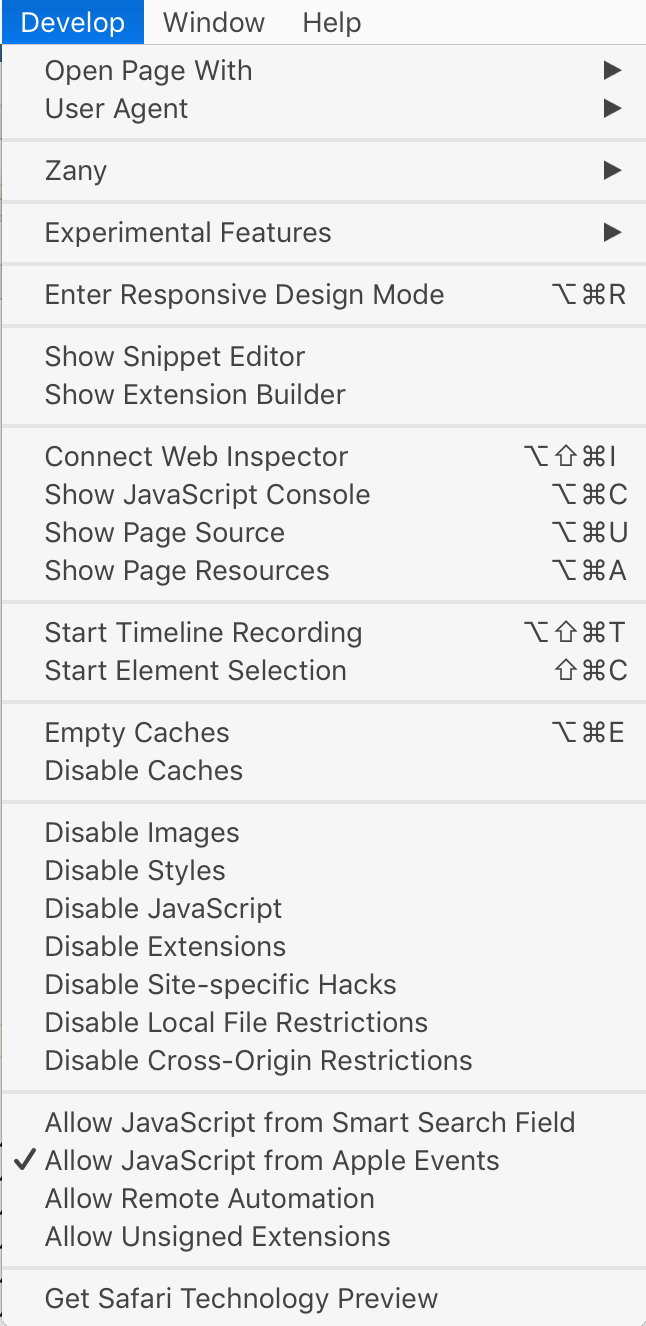
Safari Allow JavaScript
For the Safari actions to work, you must enable Allow JavaScript for Apple Events. To do so, first enable the Develop menu in the Safari preferences, and then ensure the Allow JavaScript for Apple Events option is ticked in the Develop menu.