
**This is an old revision of the document!**
Table of Contents

Public Web Trigger
The Public Web trigger makes a trigger available without further authentication via the Keyboard Maestro web server, which does require authentication to setup. See Set Setup and Use of Web Server.
Any macro with the Public Web trigger can be triggered by anyone without the username or password.
Public Web Trigger on a Macro
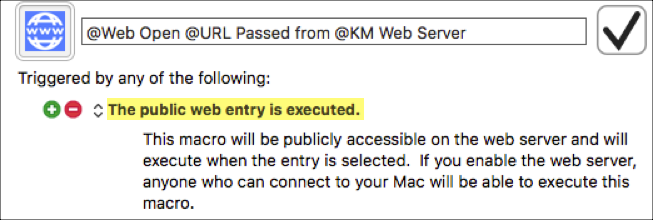
To Execute a Specific Macro
- snippet.html
http://127.0.0.1:<Port>/action.html?macro=<YourMacroUUID>&value=<TheTriggerValueToPass>
(by default, the <Port> is 4490)
Security Caution
- ⚠️ Note that this means anyone with Internet access to your Mac (which could be anyone, although it does depend on firewalls and NAT settings) can potentially trigger this macro
- So it should generally only be a safe macro, such as:
- Restarting a service that is always supposed to be running, or
- Launching iTunes or
- Some other fairly innocuous activity.
- Clearly there are some serious security issues with this, so you should use a lot of caution when you allow any macro to be executed with a Public Web trigger.
As with all triggers, macros are only available if they are currently active, that is if they are enabled and in a Macro Group that is enabled and active.
Examples
For example, if you are running some sort of process on your Mac that occasionally fails, you could write a script to restart it and make it available as a Public Web triggered Macro, which you (or anyone else) could then execute to restart the process.
For a complete example with a macro, see MACRO: @Web Open URL Passed from KM Public Web Server.