
Time of Day Trigger
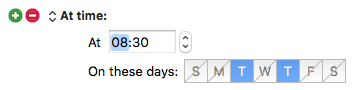
The Time of Day trigger lets you execute a Macro at a certain time of day on certain days of the week.
You could use a trigger like this to set up your Mac environment before arriving at work, run periodic maintenance or backup scripts late on the weekend, or launch iChat for your weekly video conference.
Remember that the Mac must be awake for the trigger to happen, and if the Mac is sleeping the macro will not fire at a later time.
Also remember that if the display is sleeping, screen locked or screen saving, then the macro will run, but many UI actions will not work. The actions that wake the display and/or stop the screen saver may be useful to resolve some of these issues although they cannot unlock the screen.
The blue squares represent active days.
The light colored squares with the diagonal line through them are inactive.
The presence or absence of an AM/PM indicator when you set the time depends upon your system settings, 12-hour vs 24-hour time display. The image above does not show an AM/PM indicator because the system on which the image was captured was configured to have a 24 hour clock.