
Getting_Help_in_the_Keyboard_Maestro_app
**This is an old revision of the document!**
Table of Contents

Getting Help in Keyboard Maestro App
Purpose
Provide a guide to the various means of getting help directly from the Keyboard Maestro app.
Overview
There is a great deal of help available to you directly within the Keyboard Maestro app.
This includes:
- Gear menu (options) on each Action
- Help menu
- Edit > Insert menu for:
- Actions
- Tokens
- Functions
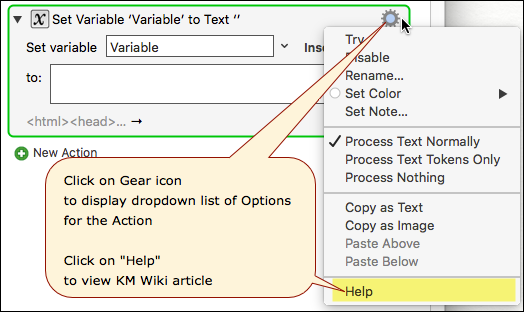
1. Action Gear Menu
You can access the Wiki Article for the Action by clicking on the Gear (Options) Menu, then click on “Help”:
2. Help Menu
There is a great deal of help available from the Help menu. Some key areas are highlighted in the below screenshot.

Links from the Help Menu:
3. Edit > Insert Menu
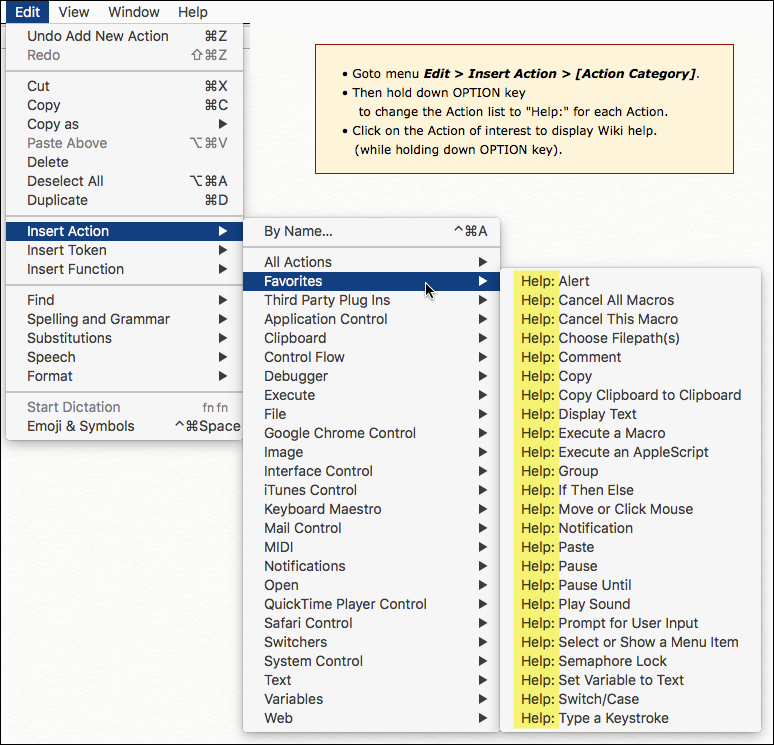
To display the Wiki Help article for an Action, Token, or Function:
- Goto the menu Edit > Insert Action or Insert Token or Insert Function
- Mouse over a Category
- Hold down the OPTION key
- Click on the item of interest
For example, with Actions:
You can view the table of contents for each of these groups here:
Getting_Help_in_the_Keyboard_Maestro_app.1487748788.txt.gz · Last modified: by peternlewis