
action:For_Each
**This is an old revision of the document!**
Table of Contents

For Each Action
The For Each action loops over a set of collections of items, setting a variable to each value and executing the contained actions.
Whenever you need to deal with a list of things (lines, files, volumes, numbers, etc), the For Each action is a good place to start.
How To Use
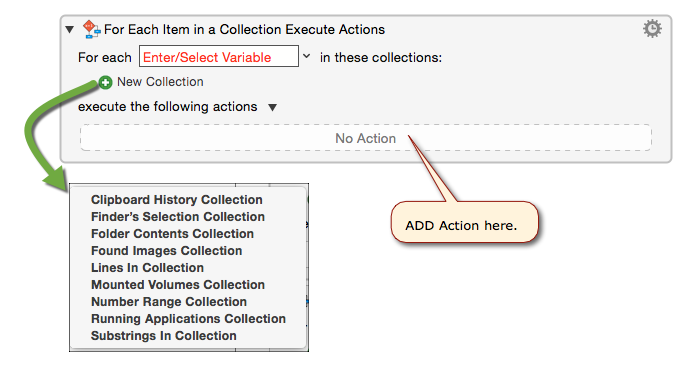
- Add the For Each Action, from the Control Flow Category, to your macro
- Enter a variable or select from the pop-up at the end of the For each text area.
- Add a collection by clicking the green + button beside New Collection to select from a list of available collections. You can learn more about the available collections on the Collections page.
- When you choose a specific collection, further options may become available.
- Drag one or more actions into the No Action (which means no actions have been added yet) area.

Examples
Example #1: Split text into lines or substrings
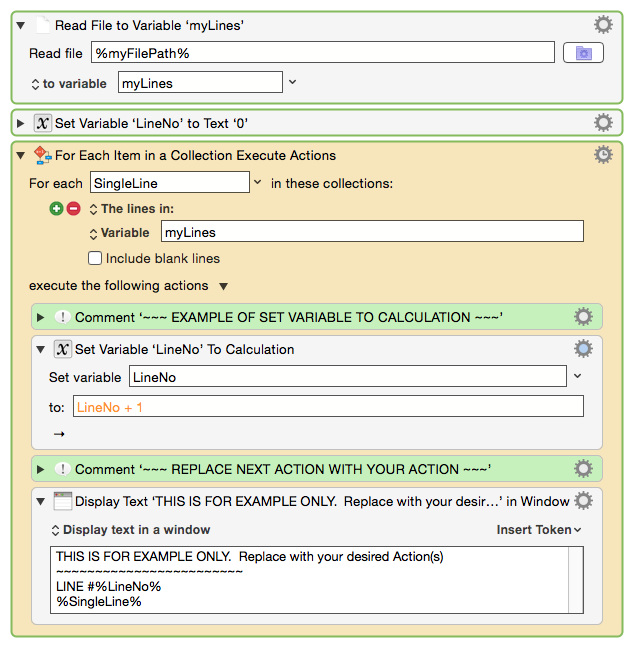
For a complete macro using this Action, see:
MACRO: [FILE] Process Lines in Text File
Example #2: Get Capture Group for Multiple Matches
See also
Forum topics
action/For_Each.1456308532.txt.gz · Last modified: by AlainLifchitz