
Table of Contents
Calculate Token
The %Calculate%<formula>% token returns the numeric result of performing a calculation,
where <formula> may be any of the following:
- Mathematical formula like
(2 + 3)*12 - Use any Variable which may be evaluated as a number
 Just enter the Variable Name (without the
 %) in the Calculate token<formula>- Examples:
%Calculate%MyVar + 1%%Calculate%(MyVarWordsPerSec * 60)/MyVarWordsPerPage%
- Use any of the built-in Keyboard Maestro functions, like RANDOM(10)
- Get the numeric value of an Variable array element, like
MyVar[2], if MyVar is10,05,12,08returns5(Arrays may contain only numeric data)
The %Hex2% token (v8+) returns the value in Hex format, padded with zeros to two digits. “2” is just an example, you can use %Hex8% for example.
The %Dec2% token (v8+) returns the value in decimal format, padded with zeros to two digits (similarly %Dec5% to five digits, etc).
The %Oct3% token (v8+) returns the value in octal format, padded with zeros to three digits (similarly % Oct5% to five digits, etc).
The %Bin8% token (v8+) returns the value in binary format, padded with zeros to eight digits (similarly % Bin16% to 16 digits digits, etc).
Example Action
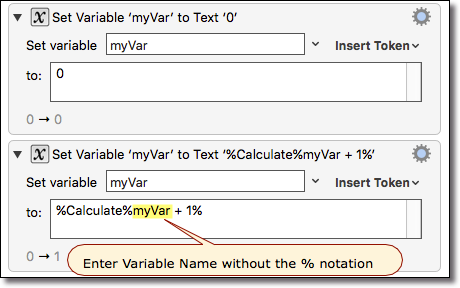
A reminder that the following are only equivalent if the Variable is numeric:
- %Variable%Count% (Variable)
- %Calculate%Count% (Number)
So, if MyVar is “005”, then
- %Variable%MyVar% will return
005 - %Calculate%MyVar% will return
5
See Also
Actions
Tokens
- %CalculateFormat% token