
Scripting
Table of Contents

Scripting on OS X Using Keyboard Maestro
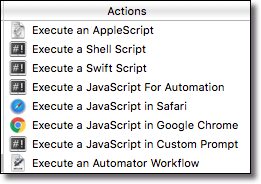
While the number of, and power of, native Keyboard Maestro Actions is vast, sometimes you may need to do something that Keyboard Maestro is not well suited to do. But Keyboard Maestro has anticipated, and provided for this, by providing a number of Execute Script Actions, all of these available from the Execute category in the Action List:
Execute Script Actions
For example, the Execute_an_AppleScript Action:
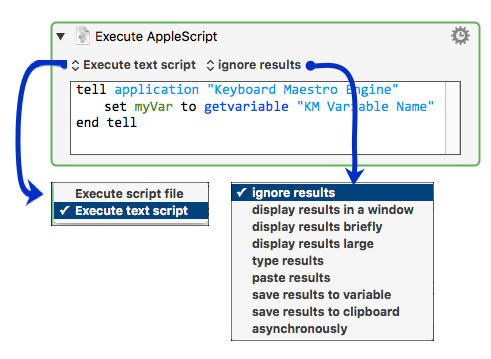
Note that the script can be either embedded in the Action, or in an external script file, linked using the Execute Script File choice.
The Actions for the other script languages are very similar.
 For more details about scripting, see the User Manual Page on Scripting
AppleScript
- AppleScript – Using Keyboard Maestro Variables in AppleScript.
- Execute an AppleScript action.
JavaScript
- Execute a JavaScript For Automation action – shows how to get/set Variables.
- Execute a JavaScript in Safari action.
- JavaScript for Automation – Provides an introduction to JXA and comparison with AppleScript.
Shell
- Execute a Shell Script action.
Swift
- Execute a Swift Script action.
Automator
See Also
- Scripting user manual section
Forum
Scripting.txt · Last modified: by peternlewis